
Securing AI Models on Edge Devices: Establishing Provenance with Thistle OTA
As AI increasingly moves to edge devices—from industrial sensors to autonomous vehicles—the integrity of deployed models becomes critical. A compromised model could produce dangerous outputs, leak sensitive data, and undermine the entire system's trustworthiness. AI model provenance—the ability to verify a model's origin and integrity—is no longer optional; it's essential.
This post explores how Thistle's OTA update system enables you to digitally sign AI model files and verify them on-device before every use, ensuring your models haven't been tampered with.
The Problem: Model Tampering at the Edge
Edge devices may operate in environments not controlled by the device maker or device owner. Unlike cloud-hosted models protected by datacenter security, edge-deployed models face unique risks:
Physical tampering: An attacker with device access could replace model files
Man-in-the-middle attacks: Network intercepted updates could substitute malicious models
Supply chain compromise: Models could be modified before deployment
Traditional deployment methods offer no way to consistently verify a model running on a device is the same one you released. How do you know an AI model file on your device hasn't changed unexpectedly?
The Solution: Cryptographic Provenance
Thistle's approach is straightforward: sign every AI model file with a cloud-KMS-managed key, and verify signatures on-device before every use.
The signature format is simple and transparent:
<timestamp>:<base64_signature>
Where the signature covers <timestamp>:<sha256_hash_of_file>. This design:
Proves the file is attested with your signing key
Records when it was signed (tamper-evident timestamping)
Works with any file type—PyTorch, TensorFlow, ONNX, or raw binaries
Two Ways to Sign: CLI or Platform
Option 1: Thistle Release Helper (TRH) — Command Line
For developers integrating into CI/CD pipelines or scripting deployments, TRH provides a direct signing workflow:
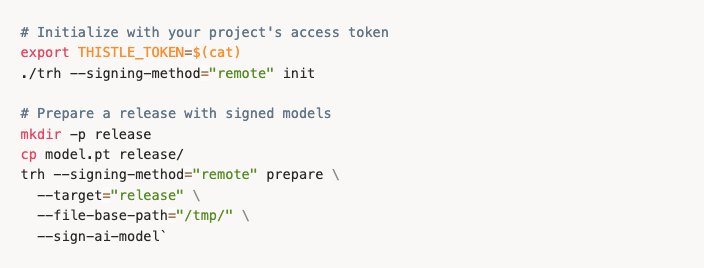
The last command above generates a .thistlesig file for each AI model file:
Signed file release/model.pt with a timestamp (e.g., 1764896091.121211750)
Signature created as release/model.pt.thistlesig
Then publish to the Thistle backend with trh release.
Option 2: Thistle Control Center — Web Platform
For teams preferring a UI-driven workflow, the Thistle Control Center offers the same signing capability through the web interface:
Upload a ZIP archive containing your model files
Enable "Generate Signatures" during upload
Wait for processing — the platform automatically signs each file in the archive
Create a release once processing completes
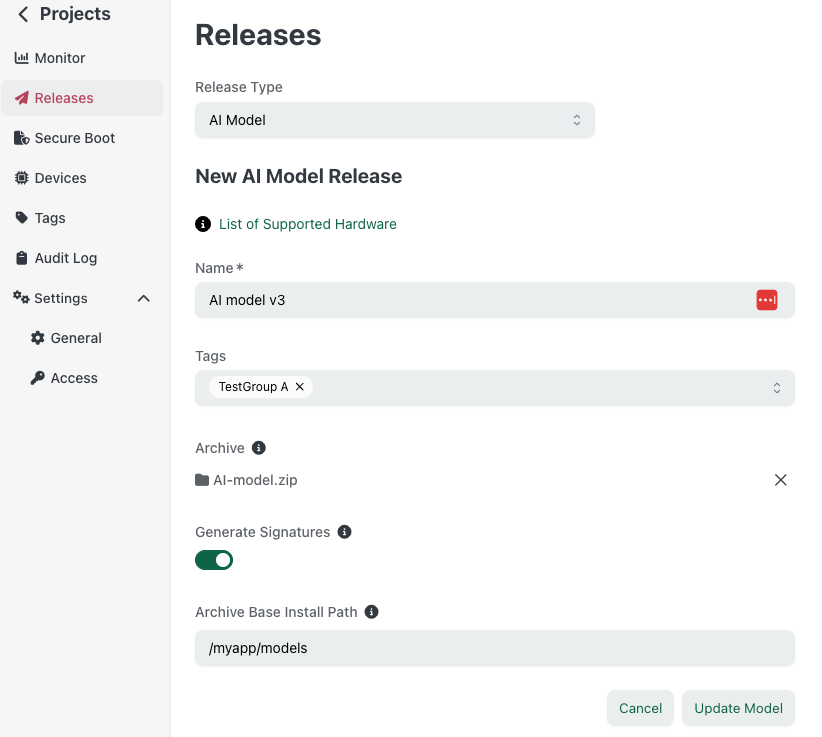
Thistle Control Center AI Model release view
Behind the scenes, the platform:
Extracts each file from your ZIP
Signs it using your project's cloud-managed key (backed by Google Cloud KMS)
Adds the corresponding
.thistlesigfileRepackages everything for deployment
This approach requires no local tooling—just upload and go.
On-Device Verification: TUC at Startup
The real power comes from runtime verification. The Thistle Update Client (TUC) can verify signatures before your AI application loads a model:
# Verify model integrity before use TUC v1.7.1 or above
tuc -c tuc-config.json verify-file /path/to/model.pt /path/to/model.pt.thistlesig
On success:

On failure (tampered file):

Integrating into Your AI Application
The recommended pattern: verify on every startup.
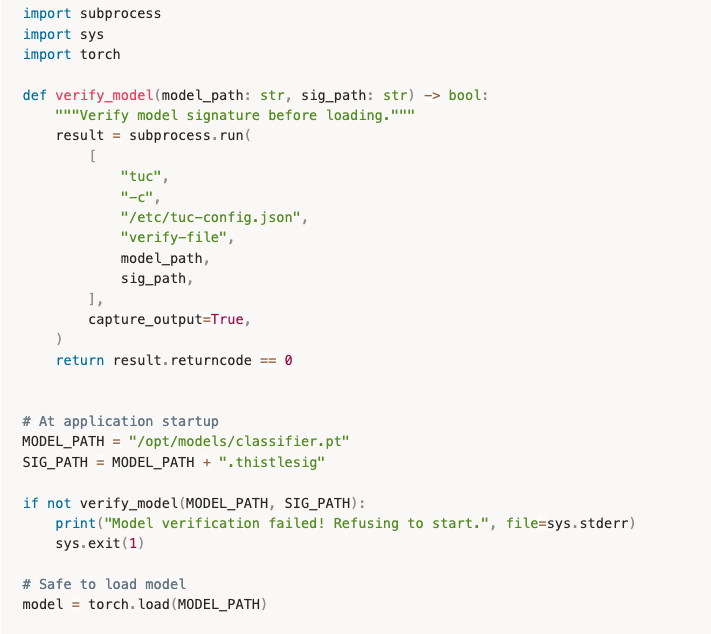
This creates security assurance: your application only runs with verified models.
Why This Matters for Regulated Industries
Industries like automotive, medical devices, and critical infrastructure increasingly require evidence of software integrity. Thistle's approach provides:
Audit trail: Every signature includes a timestamp
Key management: Private keys are backed by and never leave Google Cloud KMS
Verification evidence: TUC exit codes and logs prove verification occurred
Supply chain security: Models signed at release time, verified at runtime
Getting Started
Obtain your project access token from Thistle Control Center → Project Settings
Choose your signing method: TRH for automation, Control Center for UI-driven workflows
Configure TUC on your devices with your project's public key
Integrate verification into your application startup
For detailed instructions, see the AI Model Update documentation.
Summary
Securing AI models on edge devices requires more than secure transport—it requires proof of origin at runtime. Thistle's OTA system provides this through:
Flexible signing: CLI (
trh prepare --sign-ai-model) or web UI (Enable "Generate Signatures")Cloud-backed keys: Private keys secured in Google Cloud KMS
On-device verification:
tuc verify-fileconfirms integrity before useTransparent format: Human-readable timestamps, standard cryptographic primitives
Whether you're deploying vision models to robots or inference engines to IoT sensors, cryptographic provenance ensures your models are exactly what you released—nothing more, nothing less.
